Stream anything.
Own everything.

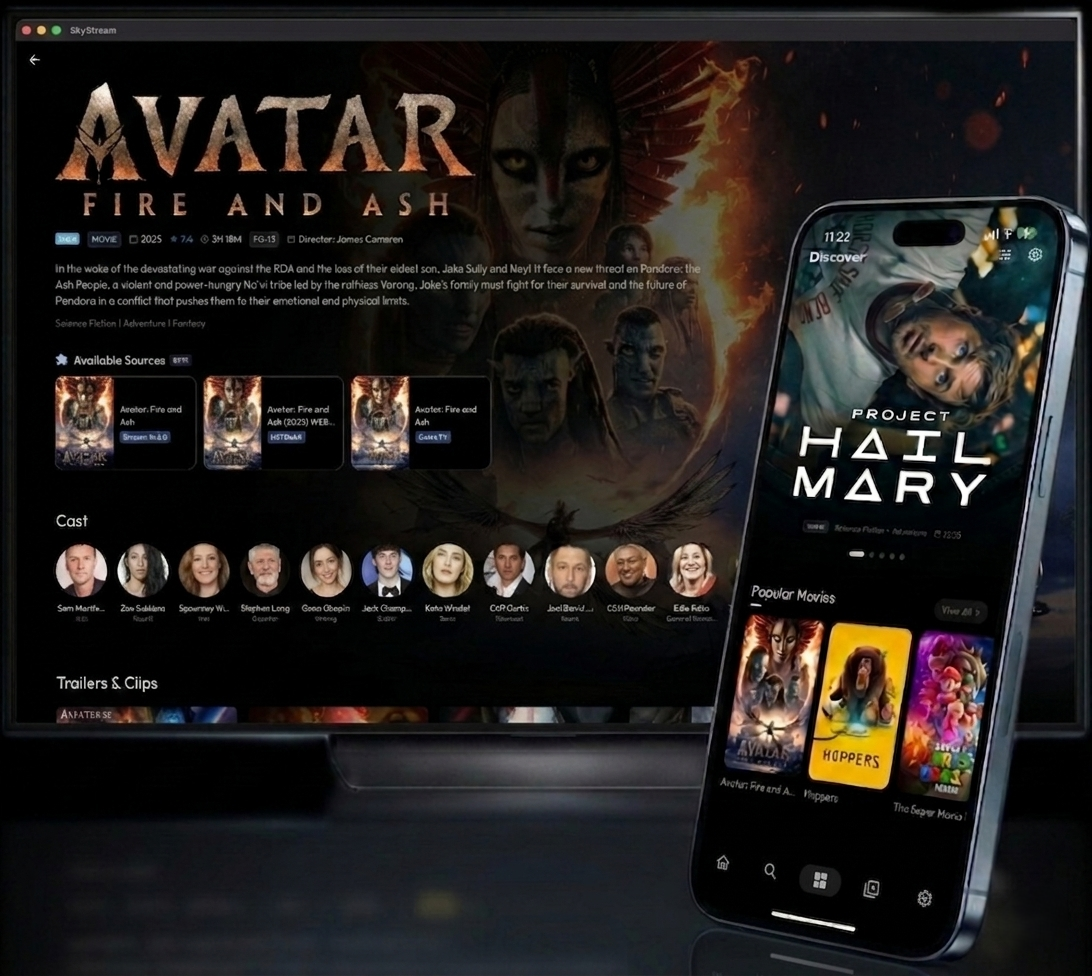
SkyStream is a modern, cross-platform media client inspired by CloudStream — rebuilt from scratch with Flutter. Install JavaScript extensions to unlock any source. No ads. No subscriptions. No strings.

This app ships with zero video sources by default. You install extensions via Settings › Extensions to add your own.
Total Downloads
10k+
across all platforms
Extensions
50+
community plugins
Platforms
6
Android · TV · iOS · Win · Mac · Linux
Price
Free
no subscriptions · no ads · forever
What's inside

Built for people who care about media.

Extension System

Install custom .sky or .js JavaScript plugins from any repository URL. Add via Settings › Extensions › Add Repository. Supports shortcodes for quick install. The same engine runs on every platform — no per-platform rebuilds.

Direct Playback

Zero-copy instant playback for local MP4 and MKV files straight from your device storage. Paste any magnet link or torrent file and it begins streaming immediately — no separate torrent client required.

Network Streams

Paste any arbitrary video URL — M3U8, MP4, HLS — directly in Settings and start watching. No extension needed for URLs you already have. Great for IPTV, personal media servers, and direct links.

Smart History

A unified "Continue Watching" list tracks progress across local files, streams, and extension content with robust timestamp tracking. Resume exactly where you left off — across sessions and app restarts.

90Hz / 120Hz Performance

Optimised frame scheduling and render pipeline for ProMotion displays. The UI stays responsive at full refresh rate even during active network streams and playback. No jank, no compromise.

Subtitles & Languages

External SRT and VTT file support. Online subtitle search via OpenSubtitles, SubDL, and SubSource. Manual sync controls. UI fully translated into 40+ languages including Hindi, Spanish, French, German, Arabic, and more — all community-driven.

Material 3 UI

Material You with dynamic colour extraction from wallpapers on supported Android versions. Responsive layouts adapt automatically between phones, tablets, and large-screen desktop. Light and dark themes included.

Available on

One codebase. Every platform.

Platform Support Notes
Android Full support arm64-v8a recommended for modern phones · armeabi-v7a for TV
Android TV Full support D-pad navigation, leanback UI, large screen layouts
iOS Sideloading required Not on App Store · Use Impactor or Sideloadly (both free)
Windows Full support Download skystream-windows.zip and extract
macOS Full support Right-click › Open to bypass "Warning" on first launch
Linux Full support Requires libmpv — install via apt install libmpv1
Getting started

Up and running in minutes.

Pick your platform below. No account required, no subscription, no telemetry.

1

Download the APK

From the Releases page, download skystream-android-arm64-v8a-v2.2.1.apk for modern phones, or armeabi-v7a for Android TV.

2

Allow unknown sources

Open the downloaded file. If prompted, enable Install from Unknown Sources in your browser or file manager settings, then tap Install.

3

Add extensions

Launch SkyStream, go to Settings › Extensions › Add Repository and enter a repository URL or shortcode. Extensions use .sky or .js format.

Download for Android →
1

Download the IPA

Get skystream-ios-unsigned-v2.2.1.ipa from the Releases page. SkyStream is not on the App Store — sideloading is required.

2

Install a sideloading tool

Use Impactor (free & open source) or Sideloadly. Windows users also need iTunes installed. Connect your iPhone/iPad via USB, drag the IPA in, enter your Apple ID, and click Start.

3

Trust the developer profile

On your device: Settings › General › VPN & Device Management › tap your email › Trust. Enable Wi-Fi sync to auto-refresh the sideloaded app in the background.

Download IPA →
1

Download the Windows archive

Grab skystream-windows.zip from the Releases page.

2

Extract and run

Unzip the archive and run skystream.exe. If Windows SmartScreen warns you, click More Info → Run Anyway.

3

Add extensions

Open SkyStream and go to Settings › Extensions › Add Repository to get started.

Download for Windows →
1

Download the macOS archive

Grab skystream-macos.zip from the Releases page.

2

Extract and open

Unzip and drag skystream.app to your Applications folder. On first launch, right-click → Open to bypass the "Unidentified Developer" warning.

3

Add extensions

Open SkyStream and go to Settings › Extensions › Add Repository to get started.

Download for macOS →
1

Install libmpv

The player requires libmpv. Install it first: sudo apt install libmpv1 (Debian/Ubuntu) or the equivalent for your distro.

2

Download the Linux archive

Grab skystream-linux.tar.gz from the Releases page and extract it.

3

Run the binary

Make it executable and launch: chmod +x ./skystream && ./skystream. Then add extensions via Settings › Extensions › Add Repository.

Download for Linux →
Contributors

Built by the community.

SkyStream is an open-source project shaped by developers from around the world. Every line of code, every translated string, and every bug report matters.

akashdh11 GitHub avatar
Lead Developer

akashdh11

@akashdh11

Creator and lead maintainer of SkyStream. Built the cross-platform Flutter architecture, custom JavaScript extension engine, and Material 3 design system from the ground up.

Want your name here? Read the contributor guide →

Community

Find your people.

Get help, share extensions, follow releases, and connect with other SkyStream users and developers.

Telegram Channel

Official announcements, extension repository drops, and quick community support. The fastest way to stay up to date with SkyStream news.

Join Telegram

Discord Server

Live chat, plugin development help, bug reports, feature requests, and community showcases. The best place for real-time conversation with the team.

Join Discord
Roadmap

Coming soon.

Features actively being worked on for the next release.

Trakt & Simkl Sync

Connect your Trakt or Simkl account to sync your watch history, ratings, and watchlists across devices and services. Your progress in SkyStream will automatically reflect on your profile — no manual logging required.

Full D-Pad / Leanback (Android TV)

Complete D-Pad navigation and a dedicated leanback UI optimised for the 10-foot Android TV experience. Every screen, menu, and player control will be fully navigable with just a remote — no touch required.

FAQ

Common questions.

No. SkyStream ships with zero video sources by default. You install extensions (JavaScript plugins) through Settings › Extensions › Add Repository to add sources of your own choice.
Go to Settings › Extensions › Add Repository and enter a repository URL or shortcode. SkyStream supports .sky and .js extension files. Extensions are user-installed JavaScript plugins that handle all content discovery and scraping.
SkyStream is a streaming client only — it does not host, store, or distribute any media content. Everything is streamed directly from the third-party sources provided by extensions you install.
No. SkyStream is an independent application built entirely from scratch in Flutter. While it draws architectural inspiration from CloudStream and supports similar extension formats, it uses a custom cross-platform JavaScript engine — making it a simplified, modern re-imagining, not a fork or direct clone.
SkyStream is not on the Apple App Store. You can install it for free using tools like Impactor (open source) or Sideloadly. Follow the iOS installation tab above for a step-by-step guide.
Extensions are JavaScript files. The full specification and API reference is in the Plugin Development Guide. Please do not build extensions that provide access to copyrighted material without authorisation — SkyStream does not condone copyright infringement.